


Published Feb 24, 2026, 12:00 PM EST
Pankil is a Civil Engineer turned freelance writer from Ahmedabad, India. As a long-time Windows and Android user, he has extensive knowledge of both operating systems and specializes in creating how-tos and troubleshooting guides.
Pankil has been writing about Windows, Android, and iOS since 2021. He has written over 1200 articles across reputable publications like MakeUseOf, GuidingTech, and TechWiser.
Outside of his writing endeavors, Pankil is an avid football fan and loves to plan his international travels with his wife in his free time.
Let’s be honest. Most Windows desktops look the same. A static wallpaper, a standard taskbar, and icons scattered everywhere. It’s functional, sure, but also a bit boring. And if your Windows PC also feels like another generic setup, there’s no shortage of customization tools that can completely change that.
You can redesign the taskbar, add useful widgets, and even place a macOS-style status bar at the top of the screen. Throw in animated wallpapers or interactive backgrounds, and it’ll feel like an entirely different operating system altogether. Best of all, these customization tools are free and easy to use.
Windhawk
A mod store for power users
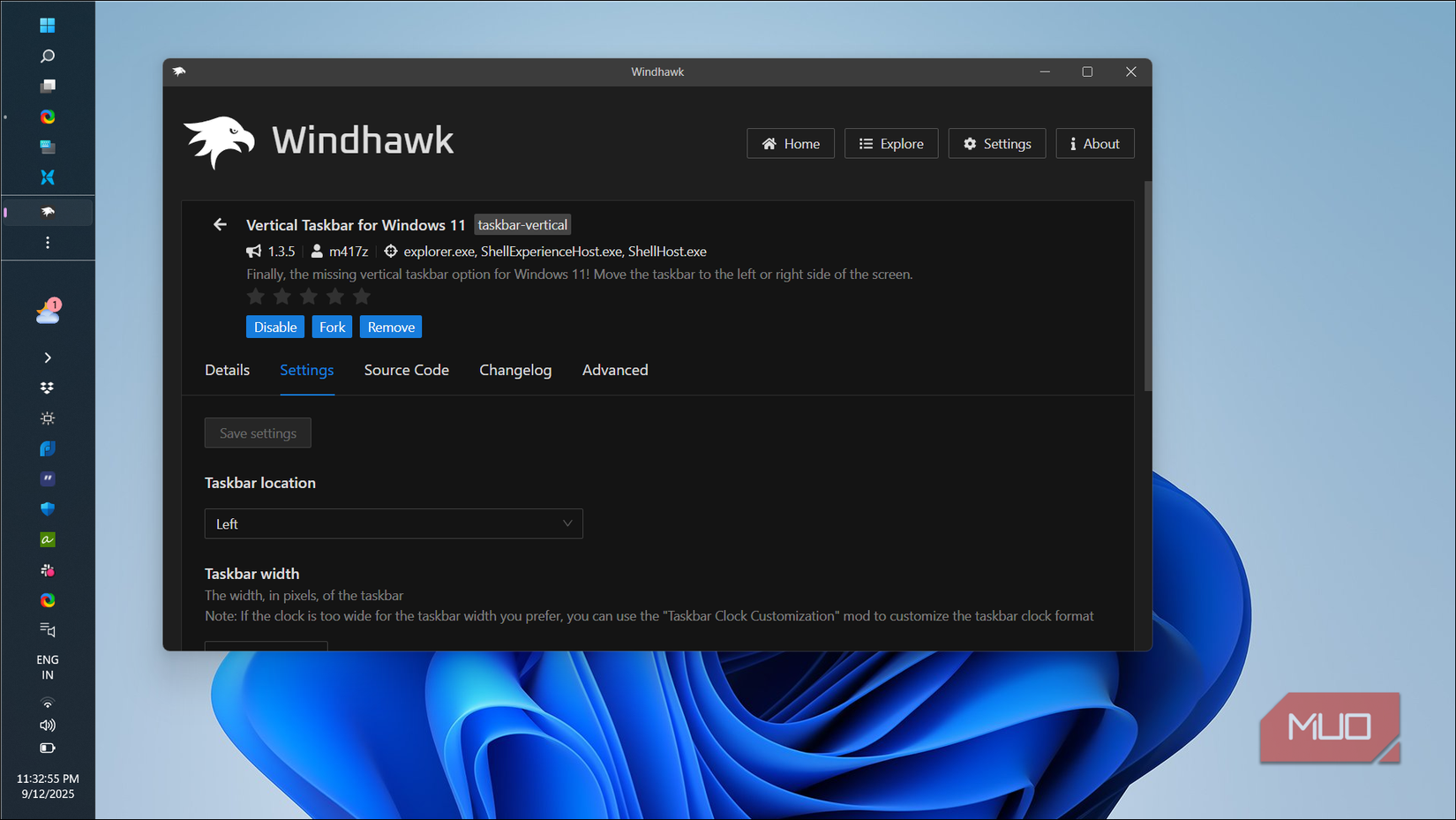
If you love tweaking Windows but don’t want to install a bunch of apps, Windhawk is the ultimate customization tool. It’s essentially a marketplace where you can find plenty of small mods to change how Windows looks and works.
For instance, there are modules that let you fix everything that’s wrong with the Windows 11 taskbar. You can resize it freely, move it to the sides or the top of the screen, and even customize it to make it look completely different. Similarly, there are mods that let you transform the Start menu. You can make it compact, enlarge it, or give it a transparent design.
Beyond the taskbar and Start menu, you’ll also find mods to customize File Explorer and add smaller features, like using the mouse wheel to scroll browser tabs. What makes Windhawk so likeable is that it’s free, easy to use, and has minimal performance impact on the system. You can enable, disable, or tweak all the mods without digging through the registry or risking system stability.

OS Windows
Developer Ramen Software
Price model Free, Open-source
Rainmeter
Turn your desktop into a dashboard

If you’re a long-time Windows user, you probably already know Rainmeter. It's the best tool for transforming an otherwise boring desktop into something more useful and personal. Rainmeter lets you add highly customizable widgets, known as skins, which are all created by its passionate community.
You can add widgets that show CPU and RAM usage, network speeds, and storage situation in real time. If you want something simple, you can add a clock, weather panel, calendar, or even a music visualizer. And it doesn’t stop there. Some skins also improve productivity. For instance, CyberSearch lets you search Google, YouTube, and Reddit right from your desktop. Others, like Notes, let you jot down notes without opening an app.
There are thousands of free skins available, so you can create almost any look you want. And the best part is, most of these skins are highly customizable, which means you can resize them, place them wherever you want, and even add or remove elements. Of course, the more widgets you add, the more CPU power they’ll need, so make sure not to get carried away.

OS Windows
Developer Rainmeter

Related
YASB
macOS style, Windows freedom
If you’d rather not clutter your desktop with widgets, but still want access to crucial information at a glance, YASB (Yet Another Status Bar) is something worth trying. It’s a free tool that adds a customizable status bar at the top of your screen.
By default, YASB only shows the name of the app currently in focus and a few handy icons. But the real fun begins when you install the widgets it offers. Yes, you get the usual system monitors for CPU, RAM, and internet usage. But YASB goes further than the typical stats panel.
For example, its AI Chat widget lets you interact with your favorite chatbot right from the status bar. There’s also a Launchpad widget that gives you quick access to your favorite apps. My personal favorite, though, is the Pomodoro widget. With it, you can start a focused work timer with a click.
And it gets better. Once you’ve personalized the status bar with your favorite widgets, you can change its look using the built-in theme options.

OS Windows
Price model Free, open-source
Lively Wallpaper
Let your background steal the show

No PC customization ever feels complete without changing the wallpaper. Windows offers some decent options out of the box, but if you want to make your desktop feel like “wow” the moment you unlock it, you need Lively Wallpaper.
It’s a free and open-source app that lets you set animated and interactive wallpapers on Windows. You can use videos, GIFs, and even webpages as your desktop background. And the tool is all about flexibility. You can import YouTube videos, use videos recorded by you, or stick with community-made wallpapers.
Of course, the biggest concern with a live wallpaper is the amount of resources it uses. Thankfully, Lively Wallpaper is designed to be efficient. For instance, when you open a full screen app or game, it automatically pauses wallpaper animations to reduce CPU usage to almost zero.

OS Windows
Developer rocksdanister
Price model Free (Open-source)
An honorable mention
While all the above tools are great, they do require manual effort on your part. You need to go through their settings, pick the right mods, and fine-tune everything to match your taste. If you want something that works right out of the box, Seleen UI is a great alternative. I’ve already covered it in detail, and it’s the easiest way to make Windows feel like something entirely different without getting lost in endless customization menus.





 English (US) ·
