

Announced in the lead-up to NAB 2026 in Las Vegas earlier this year, Blackmagic Design’s major update to DaVinci Resolve was one of the biggest storylines at this year’s conference. (In fact, it was a main topic in our podcast episode with the Blackmagic Design team at NAB this year.)
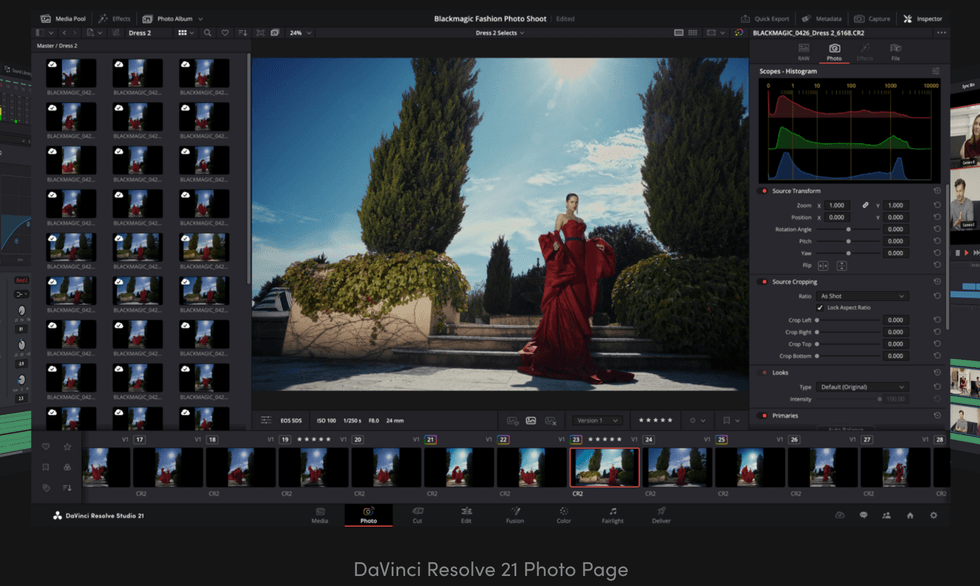
And for good reason too, as not only did Resolve 21 add over a hundred new features, it also signaled a pretty notable direction shift for the NLE, as the new Photo Page has put the platform on a path to compete directly with the likes of Adobe and its Creative Cloud apps like Photoshop.
However, while DaVinci Resolve 21 has been available in public beta, the final release day is here, and the update is now officially available for everyone.
DaVinci Resolve 21 is Live
Credit: Blackmagic Design
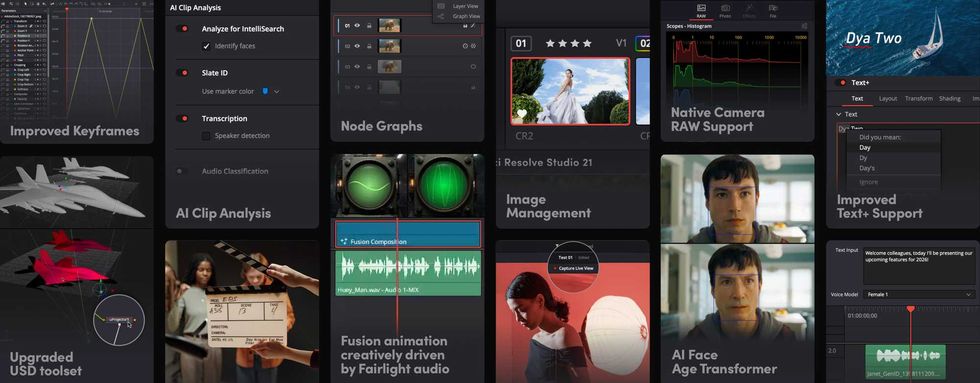
So, without getting too deep into going over all of the new updates and features to DaVinci Resolve 21, which we’ve covered before, the big news here is simply that Resolve 21 is now available for everyone. The big selling points are the addition of hundreds of new features, including AI tools such as IntelliSearch for fast content searching and CineFocus for focal point adjustment.
There’s also a ton of new motion graphic effects, Fairlight folder tracks, and of course, the infamous new Photo page for working with still images as part of your production and hybrid-content creations.
Here’s a short list of all of the major updates for DaVinci Resolve 21:
- New photo image editing now fully integrated within DaVinci Resolve.
- Support for DaVinci color control toolset and grading panels.
- Reframe and crop images at original source resolution and aspect ratio.
- LightBox view gives an overview of entire album with grades applied.
- Albums let you build, manage and tweak photos at source resolution.
- Direct image capture via Sony or Canon tethered cameras.
- Looks, LUTs, Resolve and Open FX for your images.
- Photo page is integrated with Blackmagic Cloud collaborative workflow.
- AI IntelliSearch lets you easily search for people or objects.
How to Download and Update
Credit: Blackmagic Design
As is the case with all new DaVinci Resolve updates, you can find out more info on how to download and install on the company’s website here. For specific directions for different operating systems, here are some breakdowns:
Installing DaVinci Resolve Software on macOS
Double-click the DaVinci Resolve Installer icon, then follow the on-screen instructions. To remove DaVinci Resolve from your system, double-click the Uninstall Resolve icon.
Installing DaVinci Resolve Software on Windows
Double-click the DaVinci Resolve Installer icon, then follow the on-screen instructions. To remove DaVinci Resolve from your system, go to the Programs and Features control panel, select DaVinci Resolve, click on Uninstall, and follow the on-screen prompts.
Installing DaVinci Resolve Software on Linux
Double-click the DaVinci Resolve installer, then follow the on-screen instructions. To remove DaVinci Resolve from your system, select the uninstall option after running the installer.
For DaVinci Resolve 21, we have taken efforts to keep the project libraries compatible with DaVinci Resolve 20.3.2. While this allows you to access the project library with 20.3.2, individual projects created or opened in 21 will no longer be accessible in 20.3.2. We recommend a full project library backup as well as individual project backups before opening projects in 21.




 English (US) ·
