


Published Feb 28, 2026, 6:30 PM EST
Beginning his professional journey in the tech industry in 2018, Yash spent over three years as a Software Engineer. After that, he shifted his focus to empowering readers through informative and engaging content on his tech blog – DiGiTAL BiRYANi. He has also published tech articles for MakeTechEasier. He loves to explore new tech gadgets and platforms. When he is not writing, you’ll find him exploring food. He is known as Digital Chef Yash among his readers because of his love for Technology and Food.
I’ve been exploring Claude to see where it actually fits in my daily workflow. As a freelance tech blogger, productivity matters a lot to me — not just working fast, but working smart. I don’t like complicated systems or unnecessary steps. I prefer simple setups that reduce friction and help me move from idea to published content quickly.
Instead of using Claude as just another chatbot, I started connecting it with the apps I already use every day. That’s when things changed. My workflow didn’t just improve, it accelerated. Here’s how pairing Claude with these tools turned into a serious productivity upgrade.
Notion
AI meets my structured Notion workflow
I connected Claude with Notion because that’s where most of my content operations already lived, including the content calendar, research database, drafts, and idea vault. But even with everything organized, I was still spending too much time turning raw notes into something publishable.
Now, my workflow is simple. I collect messy research inside Notion like screenshots, links, bullet points, half-written thoughts and let Claude process it. Within minutes, I get structured outlines, refined summaries, clearer arguments, and even headline variations based on the same content. It feels like having an editor built into my workspace.
What I like most is context continuity. Since everything is stored in Notion, Claude works with structured information instead of random prompts. That makes the output sharper and more aligned with my writing style.
Instead of jumping between tabs and tools, I stay inside my system. Planning, refining, and polishing now happen faster without breaking my flow.
NotebookLM
Turning knowledge bases into high-speed content machines
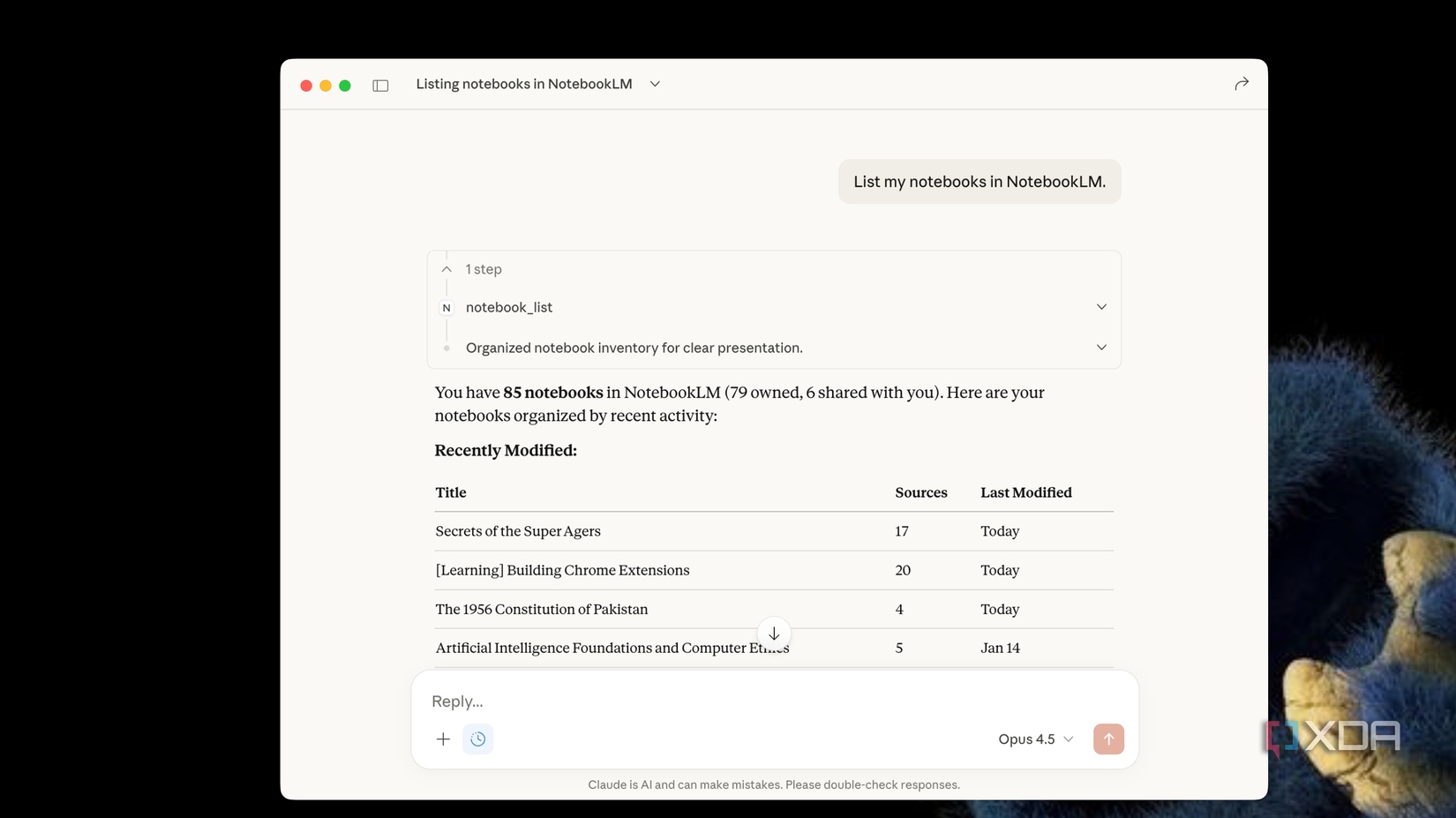
NotebookLM has become one of the biggest productivity upgrades in my research workflow. On its own, it’s already a next-level assistant. You upload PDFs, docs, YouTube transcripts, slides, or any messy research pile, and NotebookLM turns it into answers, summaries, and explanations grounded in your content, not random internet results.
But when I connected it with Claude using the Model Context Protocol (MCP) bridge, the experience went from “very helpful” to “super productive.” Instead of copying and pasting insights from NotebookLM into Claude, I can now query my notebooks directly through Claude’s chat interface. Claude pulls context from my NotebookLM knowledge base, synthesizes answers, and generates structured outputs like audio overviews, infographics, or draft sections — all based on the exact files I’ve uploaded.
For deep research articles, I don’t need to jump between tools anymore. NotebookLM becomes a searchable, grounded knowledge engine, and Claude becomes the creative generator that turns that research into real content fast, all without losing context or accuracy.
Obsidian
Making my second brain actually work

Obsidian became one of my favorite tools once I connected it with Claude and honestly, I don’t see myself going back. What makes this pairing special isn’t just slapping an AI onto a note app; it’s how Claude turns Obsidian into an active assistant instead of a static storage box.
Before, Obsidian was my vault — full of interconnected personal notes, ideas, tracking lists, and project logs. Claude changes that by acting on this data. I can ask it to update my lists, auto-generate notes based on my templates, and pull up stuff, all without manually digging through folders.
It’s not just about writing, I even let Claude generate flashcards from my notes so I can study and retain information better.
Sure, hitting usage limits can be annoying, but the productivity boost I get from offloading repetitive, clerical tasks to Claude outweighs the restrictions.

Related
Microsoft Excel
From formula frustration to AI assistance
Microsoft Excel used to be one of those tools where I had to think manually. Write formulas, debug errors, trace dependencies, and spend too much time checking logic before I could trust a sheet. That changed when I started using Claude directly inside Excel via the official add-in.
Now, instead of wrestling with complex formulas or trying to remember what a nested function does, I simply open the Claude sidebar inside my workbook and ask. Claude analyzes entire sheets, explains complicated calculations in plain language, helps me build or revise models, and even uncovers trends I might miss.
For tasks like forecasting, cleaning data, or debugging a tangled spreadsheet, Claude feels like a teammate right in the app. It highlights suggestions before applying changes, so I stay in control.
What was once hours of spreadsheet grunt work now takes minutes, and that’s productivity on steroids.
Canva
Designing faster with AI-crafted messaging

Design used to be the final step in my content workflow and honestly, the most draining one. After writing a blog, I still had to create thumbnails, LinkedIn carousels, and promotional graphics. Most of the time, I’d stare at a blank layout wondering how to compress 1,500 words into 6 clean slides.
That changed when I started pairing Claude with Canva.
Before opening any template, I ask Claude to break my article into slide-sized insights, strong hooks, and short, visual-friendly copy. It suggests headline variations, content hierarchy, and even how to structure a carousel for better engagement. Instead of dumping paragraphs into designs, I walk in with sharp, ready-to-place messaging.
If something feels cluttered, I quickly refine the copy with Claude to make it tighter and more visual.
Now, design feels strategic instead of exhausting. The words are clearer, the visuals are stronger, and I can repurpose one blog post into multiple high-quality assets in a fraction of the time.

Related
Work smarter, not harder
The biggest change for me wasn’t adding another tool. It was making the tools I already use smarter. Instead of doing everything manually, I now get help exactly where I need it.
I spend less time fixing small things and more time creating, thinking, and publishing. My workflow feels lighter. I move from idea to finished content much faster.
Nothing feels forced or complicated. It’s just smoother. That’s the real difference. When your tools start working with you instead of slowing you down, productivity doesn’t feel stressful, it feels natural.






 English (US) ·
